5 Ways Advancement Teams Can Leverage Video during FYE
Apr 2026 - READ IN 5 MINUTES

Editor’s Note: This post was originally published in June 2020. It was updated in April 2026 for clarity and comprehensiveness.
Video has become one of the most effective tools for connecting with donors, building community, and creating more meaningful engagement—especially during Fiscal Year End (FYE) campaigns. Whether you’re thanking volunteers, promoting an event, highlighting a special giving opportunity, or sending a 1:1 message to a donor, video adds a personal, human touch that drives real results.
What’s changed recently isn’t whether you should use video—it’s how you use it. Today’s most effective advancement teams are leaning into authentic, unscripted formats over polished productions, getting video into the hands of donors via text as well as email, and pairing video content with direct giving calls to action (CTAs) so inspiration doesn’t get lost between the “watch” and the “give.” AI tools are making personalized video more scalable, too—but even without them, a 30-second smartphone recording from a gift officer or student can be impactful.
With GiveCampus, you can embed livestream feeds on campaign pages, upload pre-recorded video content to simple, branded landing pages, and send 1:1 video messages directly from GC Volunteer Management and GC Gift Officer. GC Outreach handles the distribution layer—putting your video links in front of the right donors via email or text at the right moment. And GiveCampus makes it easy to pair all of your video outreach with clear call-to-action buttons that link directly to your giving forms, GC Events registration pages, and GC Volunteer Management dashboard.
To help kick off your strategy for this powerful medium, here are five practical ways to use video to strengthen your fundraising efforts this FYE.
1. Livestream a graduation message or commencement speaker (or a turtle pond!)
Livestreaming is a powerful way to bring your campus community together during FYE, and embedding a livestream on a branded GiveCampus page takes just a few clicks. It’s a great opportunity to feature a commencement speech or graduation celebration—either live or as a recorded video—for seniors, alumni, and families to experience from anywhere.
These video pages can also include links to your giving form or a relevant campaign, helping you drive engagement without overwhelming viewers. Unlike social platforms like YouTube or Facebook, GC Video pages offer a cleaner, distraction-free environment where your message stays front and center. When your livestream is live, you can push the link directly to donors via text or email with GC Outreach—no scheduling required.
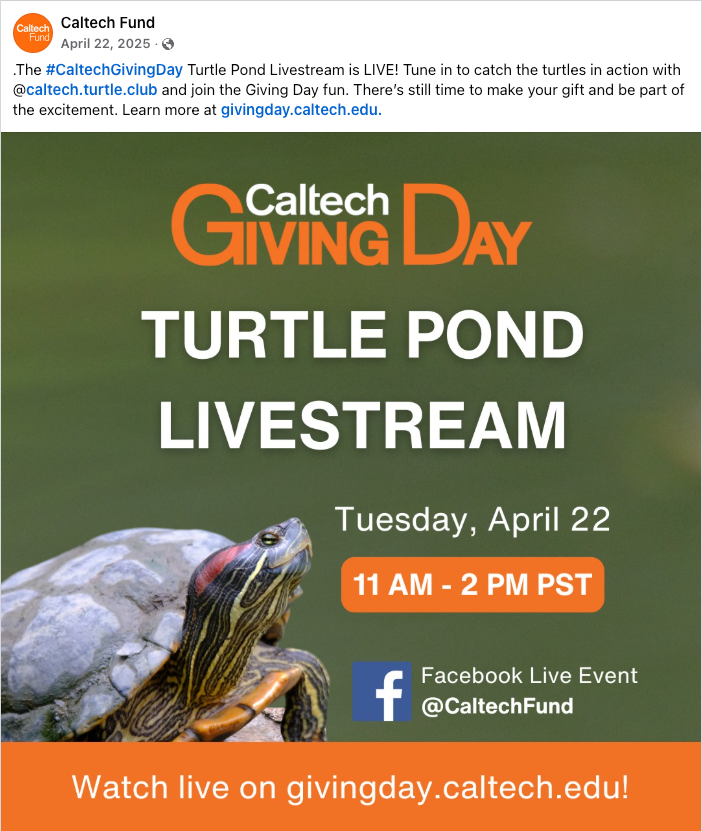
You can also leverage livestreams well beyond graduation. Take a cue from Caltech, who embedded a livestream of one of the most beloved spots on campus—a turtle pond—directly onto their 2024 Giving Day campaign page. It proved so genuinely engaging for donors that they brought it back by popular demand as a part of their 2025 Giving Day, and the original campaign has since been recognized with a CASE Circle of Excellence Award. What started as a creative one-off has become a much-anticipated feature of their annual giving day. These types of campaigns provide an extraordinary opportunity to delight, surprise, and engage donors in a fun, authentic, and completely unexpected way.
2. Send a personal ‘thank you’ to volunteers or donors
Volunteers are the MVPs of educational fundraising—why not thank this group with a video recorded just for them? And you don’t need a production budget or a video team to do it. A 30-second recording from a gift officer, a student, or a campus leader—shot on a smartphone, unscripted—often lands harder than a polished produced piece as it feels more personal and genuine.
With GiveCampus, you can thank volunteers with video in two flexible ways:
- Create a branded video landing page (using GC Video) with a thank-you message and clear CTAs—like links into GC Volunteer Management or your giving opportunities.
- Send 1:1 personal thank-you videos through GC Volunteer Management and GC Gift Officer.
For teams managing larger volunteer cohorts, GC Outreach makes it easy to send a segmented thank-you email with your video link—so the message still feels personal even when it reaches 500 people. You can easily segment by giving history, volunteer tenure, or campaign participation to make sure the right video reaches the right audience.
GiveCampus also enables 1:1 video messages directly from GC Gift Officer—an especially powerful touchpoint for stewarding major donors. The personalized video lands directly in their inbox, and the thank-you itself can include a soft next-step link, so gratitude and engagement travel together.

3. Incorporate video into your event promotion strategy
Effective event promotion relies on more than email reminders and RSVP links—it’s about building excitement, creating connection, and making it easy for your audience to say “yes.” Video can drive all three of those goals.
Whether you’re promoting a class reunion, a campaign celebration, or an annual gala, video adds energy and clarity to your outreach that static content simply can’t match. With GiveCampus, you can embed video directly into your GC Events pages, where viewers can watch a compelling message and immediately take action—like registering for an event, making a gift, or sharing the page with peers.
Here are three strategic ways to use video to boost event turnout:
- Create a personalized invitation from an event host, class ambassador, or campus leader. A friendly face makes the message more relatable and persuasive.
- Showcase highlights from past events to build anticipation and give potential attendees a preview of what to expect.
- Introduce special guests—keynote speakers, honored alumni, or performers—with a short teaser or clip ( be sure to film vertically so you can repurpose that same content on your social channels.)
By making video an intentional part of your event strategy—not just a post-event recap—you can generate stronger engagement from the very first touchpoint and ensure more of your community feels inspired to show up and get involved.
4. Prep advocates ahead of your Giving Day
If you’re planning a Giving Day or extended campaign during FYE, video can be an incredibly effective tool for rallying peer-to-peer advocates. A short, purposeful video page is a great way to explain how advocates can get involved—whether that means recording a personal appeal, sharing a campaign link, or helping amplify matches or challenges.
GiveCampus makes it simple to pair advocate videos with targeted calls to action, like links to share tools, match setup forms, or the “Become an Advocate” flow. This makes it easy for supporters to take immediate action.

Once your advocate video is live, the next step is getting it in front of the right people. Use GC Outreach to send a targeted email or text to your advocate segment—with the video link and each advocate’s unique sharing link—so everything they need is in one message. Text outreach is especially effective here: open rates on texts are significantly higher than email, and a short video link (“here’s how to share the campaign—60 seconds”) sent via GC Outreach hits differently during a busy giving season than another email asking for the same thing.
You can also send 1:1 videos directly from GC Volunteer Management for high-value asks or targeted relationship moments. The key: equip your volunteers and advocates with knowledge, show them the impact they can make, and make the path to participation simple and clear. Video can do all three—at once.
5. Announce a matching gift
Have an exciting new FYE match that you’d like to announce to donors? Feature a video from the donor or another representative of your school explaining why they’re offering this match and the impact they’re excited to make.
The deadline is your best friend here. Match campaigns live or die on urgency, and video gives you the emotional hook that makes the urgency feel real rather than manufactured. When donors can see and hear the person behind the match, the motivation to act before time runs out is tangible.
With GiveCampus, you can link directly from the video to a customized giving form created specifically for the match, or to a Social Fundraising campaign page where donors can track progress in real time. This makes it easy for supporters to act on their inspiration immediately—while also seeing the collective impact of their participation.

Curious how video can play a larger role in your FYE strategy? Let’s talk about how GiveCampus can help you build campaigns that are more engaging, more personal, and more effective this year. Schedule a call with our team.
Frequently Asked Questions
What types of video work best for FYE fundraising campaigns?
It depends on the use case, but the short answer is: authentic over produced. For stewardship and thank-you messages, a genuine 30-second recording from a staff member, student, or campus leader often outperforms polished video content. For matching gift announcements, a direct-to-camera message from the match donor carries real emotional weight. Livestreams work well for high-energy moments like giving days or graduation. Event teasers and highlight reels can be more produced since they’re building excitement rather than asking for a gift.
Do I need a production budget or video team to use video effectively?
No. Some of the most effective fundraising videos are shot on a smartphone. Donors respond to authenticity—knowing a real person took the time to record something specific for them matters more than production quality.
Can I include video in fundraising email and text outreach?
Yes. With GC Video, you can create a branded landing page for your video and share it t through GC Outreach via email or text. Video landing pages can include a call-to-action button or link that takes supporters directly to your giving form (or another next step).
What’s the difference between a GC Video landing page and posting video on social media or YouTube?
On social platforms, your video competes with everything else in a donor’s feed—and there’s no direct giving CTA. A GC Video landing page is distraction-free, branded to your institution, and built to convert: donors watch the video and have a clear, immediate path to give, register, or share. You can always use the same video in both places—just make the GC Video page your primary conversion destination.
How does GiveCampus support video in fundraising?
GiveCampus supports video across the full workflow:
- GC Video for creating branded video landing pages with giving CTAs
- GC Outreach for distributing video links via email or text
- GC Gift Officer and GC Volunteer Management for 1:1 video messaging
- GC Events for embedding video directly on event pages
It’s designed to help supporters watch, click, and take action in a streamlined flow.